SYSTEM
核心概念
src/content/notes/system/核心概念.md 核心概念
概念详解
-
Joinpoint(连接点):就是方法
-
Pointcut(切入点):就是挖掉共性功能的方法
-
Advice(通知):就是共性功能,最终以一个方法的形式呈现
-
Aspect(切面):就是共性功能与挖的位置的对应关系
-
Target(目标对象):就是挖掉功能的方法对应的类产生的对象,这种对象是无法直接完成最终工作的
-
Weaving(织入):就是将挖掉的功能回填的动态过程
-
Proxy(代理):目标对象无法直接完成工作,需要对其进行功能回填,通过创建原始对象的代理对象实现
-
Introduction(引入/引介):就是对原始对象无中生有的添加成员变量或成员方法

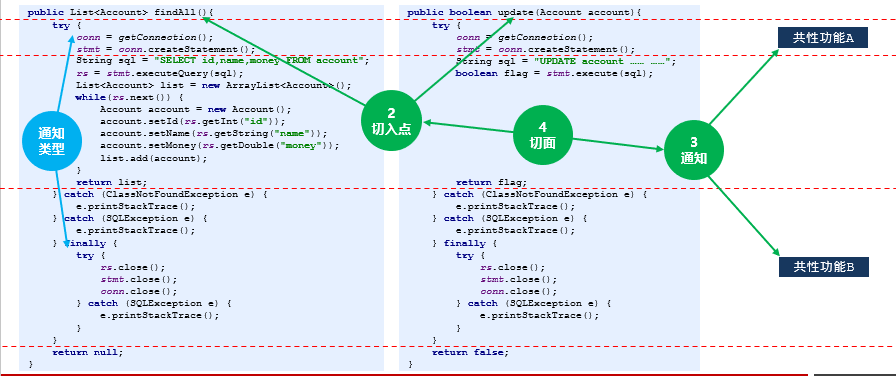

入门项目
开发步骤:
-
开发阶段
-
制作程序
-
将非共性功能开发到对应的目标对象类中,并制作成切入点方法
-
将共性功能独立开发出来,制作成通知
-
在配置文件中,声明切入点
-
在配置文件中,声明切入点与通知间的关系(含通知类型),即切面
-
-
运行阶段(AOP 完成)
-
Spring 容器加载配置文件,监控所有配置的切入点方法的执行
-
当监控到切入点方法被运行,使用代理机制,动态创建目标对象的代理对象,根据通知类别,在代理对象的对应位置将通知对应的功能织入,完成完整的代码逻辑并运行
-
-
导入坐标 pom.xml
<dependency> <groupId>org.springframework</groupId> <artifactId>spring-context</artifactId> <version>5.1.9.RELEASE</version> </dependency> <dependency> <groupId>org.aspectj</groupId> <artifactId>aspectjweaver</artifactId> <version>1.9.4</version> </dependency> -
业务层抽取通用代码 service / UserServiceImpl
public interface UserService { public void save(); }public class UserServiceImpl implements UserService { @Override public void save() { //System.out.println("共性功能"); System.out.println("user service running..."); } }aop.AOPAdvice
//1.制作通知类,在类中定义一个方法用于完成共性功能 public class AOPAdvice { //共性功能抽取后职称独立的方法 public void function(){ System.out.println("共性功能"); } } -
把通知加入spring容器管理,配置aop applicationContext.xml
<?xml version="1.0" encoding="UTF-8"?> <beans xmlns="http://www.springframework.org/schema/beans" xmlns:xsi="http://www.w3.org/2001/XMLSchema-instance" xmlns:context="http://www.springframework.org/schema/context" xmlns:aop="http://www.springframework.org/schema/aop" xsi:schemaLocation=" http://www.springframework.org/schema/beans https://www.springframework.org/schema/beans/spring-beans.xsd http://www.springframework.org/schema/context https://www.springframework.org/schema/context/spring-context.xsd http://www.springframework.org/schema/aop https://www.springframework.org/schema/aop/spring-aop.xsd "> <!--原始Spring控制资源--> <bean id="userService" class= "service.impl.UserServiceImpl"/> <!--2.配置共性功能成功spring控制的资源--> <bean id="myAdvice" class="aop.AOPAdvice"/> <!--3.开启AOP命名空间: beans标签内--> <!--4.配置AOP--> <aop:config> <!--5.配置切入点--> <aop:pointcut id="pt" expression="execution(* *..*(..))"/> <!--6.配置切面(切入点与通知的关系)--> <aop:aspect ref="myAdvice"> <!--7.配置具体的切入点对应通知中那个操作方法--> <aop:before method="function" pointcut-ref="pt"/> </aop:aspect> </aop:config> </beans> -
测试类
public class App { public static void main(String[] args) { ApplicationContext ctx = new ClassPathXmlApplicationContext("applicationContext.xml"); UserService userService = (UserService) ctx.getBean("userService"); userService.save();//先输出共性功能,然后 user service running... } }