SYSTEM
基本概述
src/content/notes/system/基本概述.md 基本概述
Docker 是一个开源的应用容器引擎,诞生于 2013 年初,基于 Go 语言实现, dotCloud 公司出品
Docker 让开发者打包开发应用以及依赖包到一个轻量级、可移植的容器中,可以发布到任何Linux机器上
-
容器是完全使用沙箱机制,相互隔离
-
容器性能开销极低。
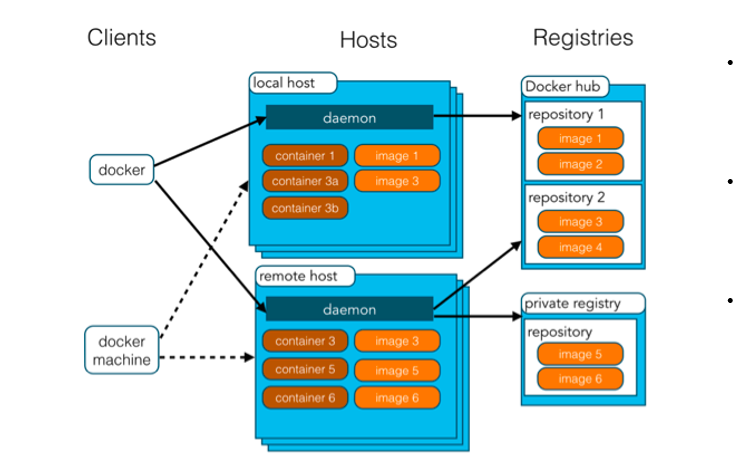
Docker 架构:
-
**镜像(Image):**Docker 镜像,就相当于一个 root 文件系统。比如官方镜像 ubuntu:16.04 就包含了完整的一套 Ubuntu16.04 最小系统的 root 文件系统
-
容器(Container):镜像(Image)和容器(Container)的关系,就像是面向对象程序设计中的类和对象一样,镜像是静态的定义,容器是镜像运行时的实体。容器可以被创建、启动、停止、删除、暂停等
-
仓库(Repository):仓库可看成一个代码控制中心,用来保存镜像
安装步骤:
# step 1: 安装必要的一些系统工具
sudo apt-get update
sudo apt-get -y install apt-transport-https ca-certificates curl software-properties-common
# step 2: 安装GPG证书
curl -fsSL https://mirrors.aliyun.com/docker-ce/linux/ubuntu/gpg | sudo apt-key add -
# Step 3: 写入软件源信息
sudo add-apt-repository "deb [arch=amd64] https://mirrors.aliyun.com/docker-ce/linux/ubuntu $(lsb_release -cs) stable"
# Step 4: 更新并安装Docker-CE
sudo apt-get -y update
sudo apt-get -y install docker-ce配置镜像加速器:
sudo mkdir -p /etc/docker
sudo tee /etc/docker/daemon.json <<-'EOF'
{
"registry-mirrors": ["https://hicqe4pi.mirror.aliyuncs.com"]
}
EOF
sudo systemctl daemon-reload
sudo systemctl restart docker